Video Interface Reference Guide
A quick reference to common video connectors and interfaces you may see on PCs and monitors.
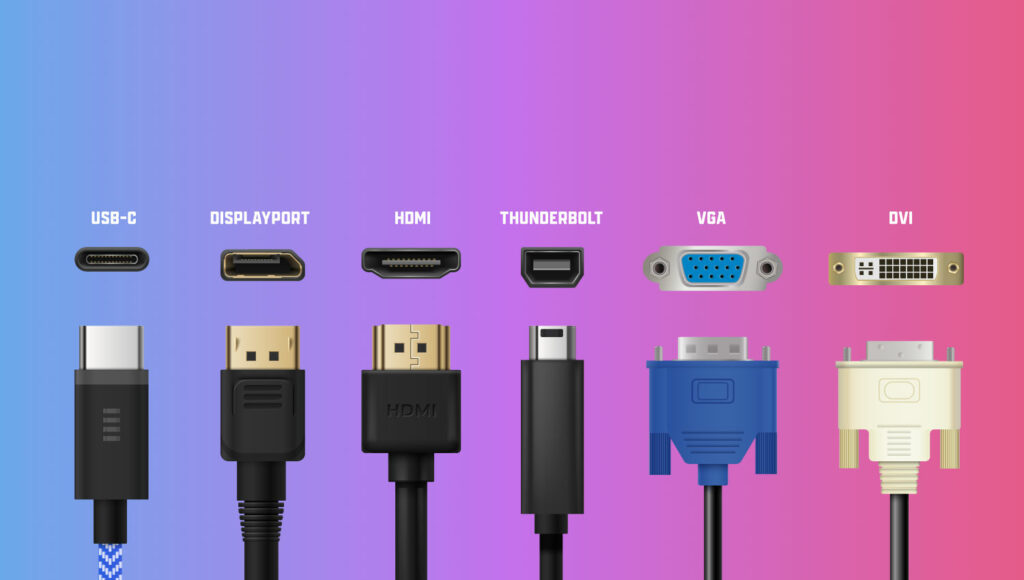
1. USB-C
- Type: Connector/interface (can carry video, data, power)
- Video Support: Uses DisplayPort Alt Mode or Thunderbolt for video
- Max Resolution: Up to 8K@60Hz (depends on version and protocol)
- Other Uses: Charging, data transfer, audio
2. DisplayPort (DP)
- Type: Digital video/audio interface
- Max Resolution: Up to 16K (with DP 2.1)
- Main Use: PC monitors, especially high refresh rate displays
- Supports: Daisy-chaining monitors (Multi-Stream Transport)
3. HDMI
- Type: Digital video/audio interface
- Max Resolution: Up to 10K (with HDMI 2.1)
- Main Use: TVs, projectors, home entertainment
- Supports: ARC/eARC (for audio return), CEC (device control)
4. Thunderbolt
- Type: High-speed interface (carries video, data, power)
- Max Resolution: Varies (Thunderbolt 3/4 can support dual 4K or single 8K)
- Video Protocol: Uses DisplayPort internally
- Main Use: Professional setups, external GPUs, docking stations
5. VGA
- Type: Analog video
- Max Resolution: Up to 1080p, but quality degrades
- Main Use: Legacy monitors and projectors
- Outdated: Yes, being phased out
6. DVI
- Type: Digital (DVI-D), Analog (DVI-A), or both (DVI-I)
- Max Resolution: Up to 2560×1600 (dual-link DVI)
- Main Use: Older PCs and monitors
- Outdated: Mostly, replaced by HDMI/DP